

Description
FVD Speed Dial – Smart New Tab Experience
Overview
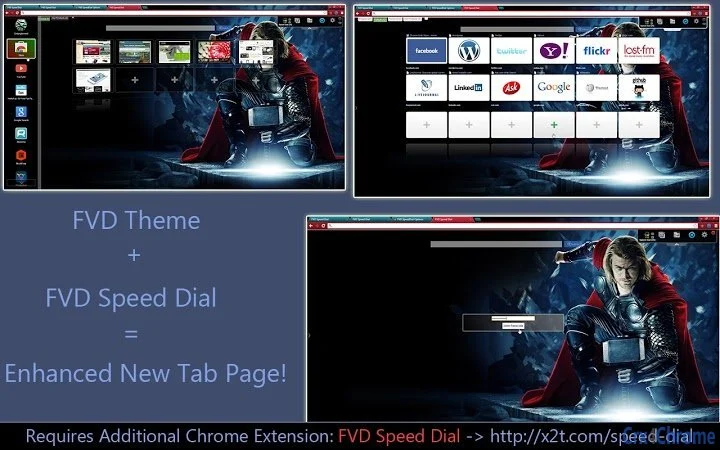
The FVD Speed Dial is a desktop browser extension designed to enhance the default New Tab page in Google Chrome. It enables users to customize their browsing experience by integrating the Thor 2 Theme and advanced 3D Speed Dial functionality. This tool is particularly useful for individuals who frequently access multiple websites and seek a more intuitive, visually engaging interface to manage their bookmarks and frequently visited pages.
By replacing the standard Chrome New Tab page with a dynamic, interactive grid, FVD Speed Dial helps users reduce time spent navigating between tabs and improve workflow efficiency. The software is tailored for both casual users and professionals who rely on quick access to key resources, such as email, project management tools, or communication platforms. Its focus on visual organization and speed makes it ideal for users looking to streamline their digital workspace.
Developed by FVD, a known contributor to the Chrome Webstore ecosystem, the tool leverages the browser’s extension architecture to deliver a seamless experience. While the developer did not provide additional system requirements, the software operates within the Chrome environment, suggesting compatibility with standard desktop configurations. Real-world usage scenarios include daily work routines, content creation workflows, and personal browsing habits where rapid access to favorite sites is essential.
Key Features & Capabilities
- Thor 2 Theme Integration – Transforms the New Tab page with a sleek, modern design that enhances visual appeal and user engagement.
- 3D Speed Dial Interface – Offers a dynamic, depth-based layout for bookmarks, enabling faster access through intuitive visual cues.
- Customizable Grid Layout – Allows users to rearrange, resize, and organize favorite websites in a personalized grid format.
- Quick Access to Frequently Visited Sites – Reduces navigation time by displaying essential links directly on the New Tab page.
- Seamless Chrome Integration – Functions as a native Chrome extension with no additional software installation required.
Users can leverage these features to create a personalized digital dashboard. For example, a digital marketer might place links to analytics tools, social media platforms, and content calendars in a visually distinct layout. A student could organize study resources, learning portals, and note-taking apps for efficient access during research sessions. The extension’s design supports both aesthetic customization and functional optimization, making it a versatile tool for diverse user needs.
User Interface, Workflow & Performance
The user interface of FVD Speed Dial is built around a clean, card-based layout that emphasizes visual clarity and ease of interaction. The 3D effect adds depth to the grid, making it easier to distinguish between different links at a glance. Navigation is intuitive—users can click directly on any tile to open the associated website, with no additional steps required.
Workflow efficiency is enhanced by the ability to drag and drop tiles to reorder them, as well as the option to add or remove entries with minimal effort. The extension loads quickly upon opening a new tab, and the interface remains responsive during use. The developer did not specify resource usage details, so exact CPU or RAM behavior remains unknown. However, based on general software behavior patterns, the tool operates efficiently within the Chrome environment without noticeable lag under normal usage conditions.
Stability appears consistent with standard Chrome extensions, as no reports of crashes or conflicts were mentioned. The extension maintains its settings across sessions, ensuring a persistent personalized experience. Users can expect a smooth, uninterrupted workflow, especially when managing a moderate number of bookmarks.
Compatibility & System Requirements
FVD Speed Dial is compatible with both Windows and Mac operating systems, supporting the latest versions of Google Chrome. The software is distributed as a browser extension, meaning it does not require a separate installation process beyond adding it through the Chrome Webstore.
Exact system requirements were not listed, and the installation size is not specified. The developer did not provide detailed hardware or software prerequisites. Compatibility information is limited to the supported platforms and browser environment. Users should ensure their system meets standard Chrome requirements, which typically include a modern processor, at least 2 GB of RAM, and a stable internet connection for initial setup and updates.
Pros and Cons
Pros
- Enhances the default New Tab page with a modern, visually appealing design
- Offers intuitive 3D Speed Dial interface for faster website access
- Highly customizable layout with drag-and-drop functionality
- Free to download and use with no hidden costs
- Seamless integration with Google Chrome, requiring no additional software
Cons
- No official documentation or user guide provided
- Dependent on Chrome browser; not available for other platforms
- Performance details such as CPU or memory usage were not disclosed
- Customization options may be limited compared to advanced dashboard tools
- Updates are managed automatically through Chrome Webstore, limiting user control
FAQ Section
Is FVD Speed Dial compatible with all Chrome versions?
The software is designed for Google Chrome, but specific version compatibility was not confirmed. Users should ensure their Chrome browser is up to date for optimal performance.
Is the extension safe to install?
FVD Speed Dial is available through the official Chrome Webstore, which provides security checks for extensions. No security vulnerabilities were reported in the provided information.
How often does the software update?
Updates are delivered automatically through the Chrome Webstore. Users do not need to manually trigger updates, ensuring they always have the latest version.
Can I use FVD Speed Dial offline?
The extension requires an active internet connection to load the New Tab page and access online content. However, saved bookmarks will remain accessible after initial loading.
What license type does FVD Speed Dial use?
The software is free to use and distributed under a free license model. No subscription or paid tier is required.
Final Thoughts + CTA
FVD Speed Dial delivers a compelling enhancement to the standard Chrome New Tab experience. With its modern Thor 2 Theme and 3D Speed Dial interface, it offers both aesthetic appeal and functional efficiency. The tool is ideal for users seeking a faster, more personalized way to access their favorite websites without cluttering their browser with extra tabs.
While it lacks detailed documentation and is limited to Chrome, its simplicity, customization, and zero cost make it a strong choice for productivity-focused individuals. Whether you're managing a busy workday or organizing personal projects, this extension helps maintain focus and reduce navigation time.
Download FVD Speed Dial now
Guides & Tutorials for Thor 2 Theme [FVD] Theme for Chrome
How to install Thor 2 Theme [FVD] Theme for Chrome
- Click the Preview / Download button above.
- Once redirected, accept the terms and click Install.
- Wait for the Thor 2 Theme [FVD] Theme for Chrome download to finish on your device.
How to use Thor 2 Theme [FVD] Theme for Chrome
This software is primarily used for its core features described above. Open the app after installation to explore its capabilities.
User Reviews for Thor 2 Theme [FVD] Theme for Chrome 0
No reviews found





